
Aug 2007
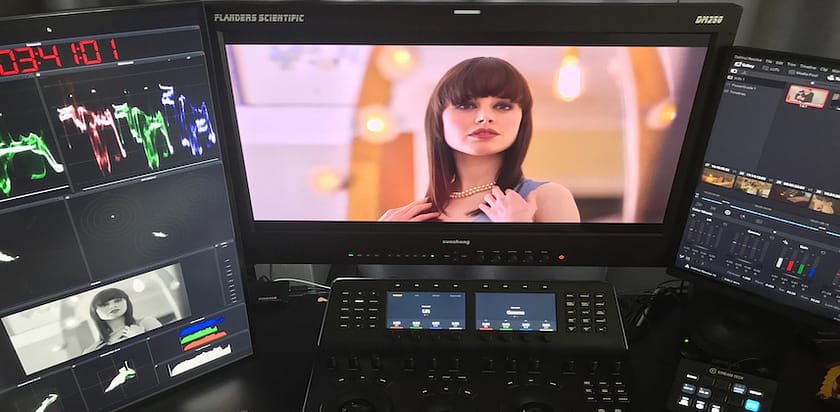
More on the JL Cooper control surfaces...
Aug/29/2007 15:41 Filed under:
Tools
In a follow up to my previous post -
if you visit the links in that post, you'll notice that the layout
of the Eclipse ($7,000) and the MCS-Specturm + MCS-3000 ($5700) are
exactly the same. They are both combo colorist + transport panels.
Knobs, displays, and buttons are identically laid out. Last week I
went a few rounds of email with Danny O'Donnell, National Account
Exec at JL Cooper, and asked him, "What's different?" Here's his
response:
Over the next two weeks I plan on demoing both the CX and the MCS-Spectrum. I'll report back my findings...
- pi
- "The MCS/3000/MCS-Spectrum was our first controller for
advanced color correction.
- The Eclipse CX is a newer generation of this same
functionality.
- The complete button/function layout is consistent between both
designs.
- The Eclipse CX has added lighted buttons for every control,
Aluminum side panels and an overall lighter design.
- The rings on the Eclipse CX are sealed and mounted with
rubberized ring surface for more precise control.
- The Eclipse CX uses just one power supply unlike the
MCS-3000/Spectrum.
- We have also finished it off with brushed aluminum knobs and a
new grey and black finish.
- Oh, we also made the front of the Eclipse with a single piece
of metal top and also one piece bottom.
- Finally, we have added a power supply with a locking connector."
Over the next two weeks I plan on demoing both the CX and the MCS-Spectrum. I'll report back my findings...
- pi
|
Eclipse CX Telecine Control Surface - Shipping
Aug/21/2007 11:30 Filed under:
Tools
I love control surfaces. I've long
felt that one of the great drawbacks to Non-Linear Editing Systems
is their lack of specialized input devices. From switchers to
K-Scopes to mixers, all these staples of the linear edit bay were
reduced to a QWERTY keyboard and the fingernail-tip of the point of
a mouse. A year ago I invested in a Tascam FW-1884 mixing board,
which allows me to control my audio levels in Final Cut Pro, live -
without stopping playdown of the timeline. I adore that piece of
hardware. And I want more. More. MORE.
So it's not surprising that every month since NAB I've been 'pinging' the National Account Executive of JL Cooper about the shipping status of the Eclipse CX - their new colorist control surface. Yesterday I got word it's finally shipping. The shipping price is $7,000 + $300 ethernet controller . Currently there are three alternatives to the Eclipse:
I'm definitely in the market for a control surface. And since I don't do leases (cash only, baby) I'm more price sensitive than I might otherwise be - accounting for my not having invested in one of these yet. But keep an eye on this space, as I'll report back once I've gotten my formerly nicotine-stained fingers on one of these control surfaces.
Oh, and it seems Tangent Devices is responding to the release of the Eclipse CX with a specially priced bundle. Gotta love competition.
- pi
So it's not surprising that every month since NAB I've been 'pinging' the National Account Executive of JL Cooper about the shipping status of the Eclipse CX - their new colorist control surface. Yesterday I got word it's finally shipping. The shipping price is $7,000 + $300 ethernet controller . Currently there are three alternatives to the Eclipse:
- JL Cooper MCS-3000 Series (approx $5700, same configuration as the Eclipse CX)
- Tangent Devices 200 Series (approx $5000 per panel)
- Tangent Devices CP-100 (approx $30,000)
I'm definitely in the market for a control surface. And since I don't do leases (cash only, baby) I'm more price sensitive than I might otherwise be - accounting for my not having invested in one of these yet. But keep an eye on this space, as I'll report back once I've gotten my formerly nicotine-stained fingers on one of these control surfaces.
Oh, and it seems Tangent Devices is responding to the release of the Eclipse CX with a specially priced bundle. Gotta love competition.
- pi
ProResSD - On a G5? You might want to avoid it
Aug/17/2007 18:41 Filed under:
Post-Production
After
the results of the ProResSD tests I performed, I've started using
it in situations where pristine quality wasn't a concern. And the
more I use it the less likely it is I'll continue to use it.
This has nothing to do with its quality and everything to do with the fact that I'm still on a G5 (Dual 2.5).
If I do *anything* to ProResSD compressed images, the image quality drops to "Preview" - meaning I have to render before doing any outputs. After 18 months of working on this machine in which I can often have two 3-Way Color Correction filters, plus Broadcast Safe, with a crop or reposition and have everything playback at full quality with no rendering - having to force a render for even the slightest repo is driving me nuts.
I can safely say I'll be using ProResSD a lot less than I thought I would. Considering that a Quad-Core is in the near-term future I don't have the time or inclination to deal with the extra overhead forced upon me by this new codec.
If anyone has any experience using ProResSD on a Mactel, please drop a message in the Comments box. I'd love to know your experiences.
- pi
This has nothing to do with its quality and everything to do with the fact that I'm still on a G5 (Dual 2.5).
If I do *anything* to ProResSD compressed images, the image quality drops to "Preview" - meaning I have to render before doing any outputs. After 18 months of working on this machine in which I can often have two 3-Way Color Correction filters, plus Broadcast Safe, with a crop or reposition and have everything playback at full quality with no rendering - having to force a render for even the slightest repo is driving me nuts.
I can safely say I'll be using ProResSD a lot less than I thought I would. Considering that a Quad-Core is in the near-term future I don't have the time or inclination to deal with the extra overhead forced upon me by this new codec.
If anyone has any experience using ProResSD on a Mactel, please drop a message in the Comments box. I'd love to know your experiences.
- pi
ProRes SD Results (Finally)
Aug/01/2007 15:54 Filed under:
Post-Production
2 weeks
ago I finished my testing on the ProRes SD flavor of Apple's new
codec. While many have tested the ProResHD variant, the SD variant
hasn't been quite as scrutinized. Perhaps that's because hard
drives have gotten so large and pipelines so wide that a 25 mb/s
files isn't the bottleneck it used to be? Still, if you can save
the space without giving up quality why not jump off the
Uncompressed codec and onto the ProRes bandwagon when working at
Standard Definition? To make an informed jump, we need some facts.
What follows is the result of some of my "fact-checking" as I
determine if ProRes SD is worthy as a 'finishing' codec and can
withstand a common finishing workflow.
And if you want more info on the ProRes codec, here's the direct download of Apple's ProRes white paper.
Judging Criteria: To judge if ProResSD was a "finishing" codec I decided I had to be able to cut, mid-shot, the original 10bit textless back into the 3rd Generation ProResSD Protection Master - as if I were creating an International Generic Master. And at the edit point it had to have no visible difference to both the human eye and the waveform/vectorscope. This is a test I know a fully 10bit uncompressed workflow could easily pass. And frankly, this is not a very challenging test even for an analog tape format like D-2 (assuming an all-digital environment). So my judging on ProResSD will be fairly harsh - it needs to be perfect.
Methodology: Using a reality series I finished earlier this year as reference footage - I created a 2 minute test sequence comprised of interiors, exteriors, day, night, interview and run & gun situations. The footage was originally shot anamorphically on DVCPro, conformed in an Avid at 1:1 and then it was output to Digibeta for final finishing in our FCP finishing bay. I captured the footage via Decklink HD Pro SDI to 4 codecs:
Simulating the worst-case scenario for a show being delivered to a network - I assumed the footage would be output and recaptured several times:
Difference Tests (images will open in new windows):
Frankly, I was surprised how well the DV Promote workflow held up. After the initial hit during capture, the ProResSD didn't allow it to degrade any further. In my opinion, this is a viable workflow for DIY'ers who don't have SDI workflows available to them. But as you can probably see from the difference tests, the ProResSD is indeed lossy - but we already knew that, Apple doesn't make any claims otherwise. Which brings me back to where I started:
A: The answer to both parts of that compound question is... When playing at speed, 1st Generation 10bit is indistinguishable from 3rd Generation ProResSD. I can't see the edit. By that standard ProResSD is indeed a finishing codec, even as we know there's been slight generational loss as observed in the difference tests.
But: When paused on identical frames and quickly toggling between 1st generation Uncompressed and the 3rd generation ProResSD - levels and chroma are rock solid steady, but there is a oh-so-slight softening of the image. It's slight enough that most my clients won't be able to see it. Heck, I barely see it. Though once I noticed it on the monitor and l looked back at my scopes, I could see a teeny softening of the trace. It wasn't evident in every shot, only those with heavy details (usually in the background). So...
ProsRes SD is an impressive codec. While only doubling the storage space of DV it gives 98% of the quality of Uncompressed. Good enough for finishing purposes? Yes. I would not use it for heavy compositing where every drop of detail is essential. Unlike the HD variant, which I've heard is rock-solid through (at least) 10 generations, the SD variant's 'lossy-ness' does exist after 3 generations.
And here's where the rubber meets the road: Will I be using it as my codec of choice? Not for network deliverables. I want my images as pristine as possible and with storage space so cheap, 25 MB/s isn't that big a deal anymore. But I will use it for creating DVD, web deliverables, screening copies, etc - replacing 8bit uncompressed as my codec of choice for those elements. And on low budget projects without compositing needs - I'm sure there will be a few projects where I will advocate capturing ProResSD to use it from the first Assembly through the end to final Master.
UPDATE: If you're running on a G5, be sure to read this follow-up post why Pro-Res isn't quite so thrilling on those machines.
- pi
And if you want more info on the ProRes codec, here's the direct download of Apple's ProRes white paper.
Judging Criteria: To judge if ProResSD was a "finishing" codec I decided I had to be able to cut, mid-shot, the original 10bit textless back into the 3rd Generation ProResSD Protection Master - as if I were creating an International Generic Master. And at the edit point it had to have no visible difference to both the human eye and the waveform/vectorscope. This is a test I know a fully 10bit uncompressed workflow could easily pass. And frankly, this is not a very challenging test even for an analog tape format like D-2 (assuming an all-digital environment). So my judging on ProResSD will be fairly harsh - it needs to be perfect.
Methodology: Using a reality series I finished earlier this year as reference footage - I created a 2 minute test sequence comprised of interiors, exteriors, day, night, interview and run & gun situations. The footage was originally shot anamorphically on DVCPro, conformed in an Avid at 1:1 and then it was output to Digibeta for final finishing in our FCP finishing bay. I captured the footage via Decklink HD Pro SDI to 4 codecs:
- 10bit Uncompressed
- ProRes SD (High Quality)
- ProRes SD (Standard Quality)
- DV
Simulating the worst-case scenario for a show being delivered to a network - I assumed the footage would be output and recaptured several times:
- Textless Output
- Textless Captured, Master Output
- Master Captured, Protection Output
- Protection Captured, International Generic created
Difference Tests (images will open in new windows):
- Digibeta
Capture: download image
(2MB)
I did this series of difference tests mostly from curiosity. It compares the 10bit Uncompressed to each of the other three codecs before any other processing. It gives an idea as to how much detail each codec throws away. If you've ever wondered why so many of us despise working with DV, every bit of detail you see in these tests is detail retained by the 10bit Uncompressed codec and thrown away by the DV codec.
- Color Correct
Output: download
image (2MB)
After rendering the color correction out from Color, I did another series of differences versus the 10bit render. I was looking for any obviously increased degradation that wasn't seen in the first set of Digibeta Capture difference tests. I don't see any. Color seemed to render them cleanly - especially the DV rendered out as ProResHQ which didn't seem to suffer any additional degradation, leaving open one interesting workflow possibility for those with constrained budgets and originating from DV.
- 3rd Generation
Tests: download
image (2MB)
After round-tripping from FCP to Digibeta 3 times, I again made a series of differences, this time between each codecs Textless and its 3rd generation - seeing how well it held up. The 10bit Uncompressed was rock-solid black, so I didn't bother to include it here.
Frankly, I was surprised how well the DV Promote workflow held up. After the initial hit during capture, the ProResSD didn't allow it to degrade any further. In my opinion, this is a viable workflow for DIY'ers who don't have SDI workflows available to them. But as you can probably see from the difference tests, the ProResSD is indeed lossy - but we already knew that, Apple doesn't make any claims otherwise. Which brings me back to where I started:
Conclusion
Q: Can a 3rd generation copy be visually distinguished when edited mid-shot into a 1st generation copy or can it be easily observed using a waveform monitor or vectorscope?A: The answer to both parts of that compound question is... When playing at speed, 1st Generation 10bit is indistinguishable from 3rd Generation ProResSD. I can't see the edit. By that standard ProResSD is indeed a finishing codec, even as we know there's been slight generational loss as observed in the difference tests.
But: When paused on identical frames and quickly toggling between 1st generation Uncompressed and the 3rd generation ProResSD - levels and chroma are rock solid steady, but there is a oh-so-slight softening of the image. It's slight enough that most my clients won't be able to see it. Heck, I barely see it. Though once I noticed it on the monitor and l looked back at my scopes, I could see a teeny softening of the trace. It wasn't evident in every shot, only those with heavy details (usually in the background). So...
ProsRes SD is an impressive codec. While only doubling the storage space of DV it gives 98% of the quality of Uncompressed. Good enough for finishing purposes? Yes. I would not use it for heavy compositing where every drop of detail is essential. Unlike the HD variant, which I've heard is rock-solid through (at least) 10 generations, the SD variant's 'lossy-ness' does exist after 3 generations.
And here's where the rubber meets the road: Will I be using it as my codec of choice? Not for network deliverables. I want my images as pristine as possible and with storage space so cheap, 25 MB/s isn't that big a deal anymore. But I will use it for creating DVD, web deliverables, screening copies, etc - replacing 8bit uncompressed as my codec of choice for those elements. And on low budget projects without compositing needs - I'm sure there will be a few projects where I will advocate capturing ProResSD to use it from the first Assembly through the end to final Master.
UPDATE: If you're running on a G5, be sure to read this follow-up post why Pro-Res isn't quite so thrilling on those machines.
- pi


